A few people at the Emetrics Summit told us they'd like to learn more tips and tricks for implementing Google Analytics. So in the next few weeks we will begin including tips straight from various members of the Google Analytics team. And we'll kick it off with a tip for bloggers, though anyone can use it.
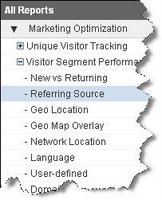
One of the most important things for a blogger to know is how people find his or her blog. Links and referrals are an integral part of blogging culture. Many blogs display a finite number of links to a post. Of course, you can see referring links aggregated and displayed in your Google Analytics reports, within your Marketing Optimization > Visitor Segment Performance > Referring Source report.
Unfortunately, the Referring Source report shows only the referring
domain. You can't see what comes after the domain -- the rest of the referring link -- to see the exact page on the site that contained the link to your blog. There is a way to see this data however: by cross-segmenting a referring source by Content.
Here are the steps to follow:
-
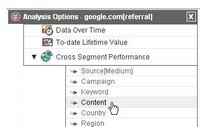 In the Marketing Optimization > Visitor Segment Performance > Referring Source report, click on the red button containing two "up" arrows, located to the left of any referring source in the data table. You will see the "Analysis Options" table.
- Choose "Cross Segment Performance" and then you will see a drop down menu.
- Choose to cross segment the entry by "Content."
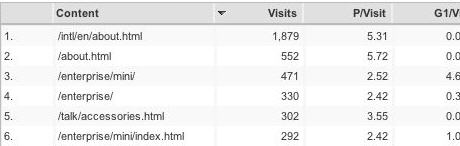
This will take you to a new data table that shows you the rest of the referring URL -- not including any dynamic query parameters (anything after a question mark, for instance). Here's what you'll see:
Here are some other ways you can use Google Analytics to monitor your blog:
- find out what posts readers liked the most by looking at daily visits and popularity of permalinks. (Knowing this can influence what you write about.)
- see if you're keeping your readers by comparing new vs. returning visitors
- find out how people exit your blog, as well as measure subscriptions to your feed using UrchinTracker on your links
- see how long readers spend looking at your content by looking at average length of visits
- monitor visitor activity after you make a post to see when daily visit levels taper off. (That means it's time to post again.)
Feel free to share your best practices for bloggers in the
Analytics Forum.
Posted by Gauri Deshmukh and Jeff Gillis, Google Analytics Team